
A food diary for people who cook
Know the calories in the meal you cooked
Packets have a barcode. A pot does not. Zone Life starts from the ingredients you put in, logs the share on your plate, and keeps the recipe for the next time you cook it.
Free to start on the web. The iPhone app includes a 7 day free trial of Zone Life Pro.
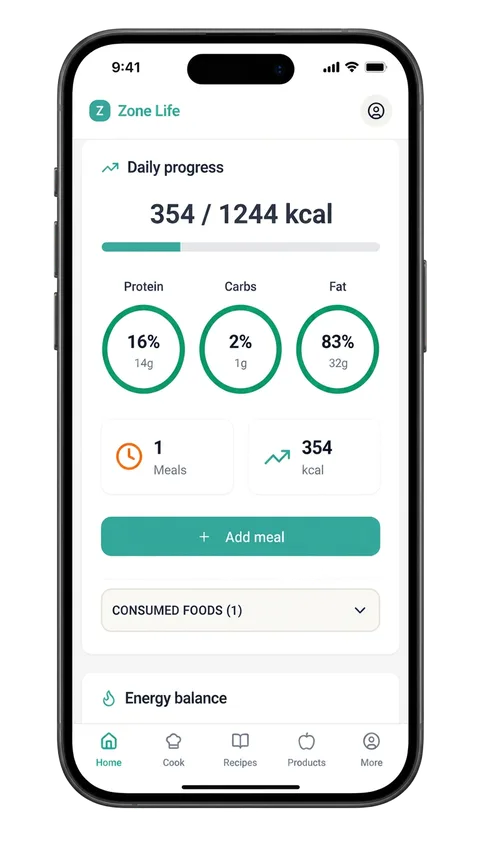
Your plate
Tomato chicken
261.2 kcal
- Protein
- 36.7 g
- Carbs
- 10.7 g
- Fat
- 8.0 g
One third of a 900 g pot
A look inside the app
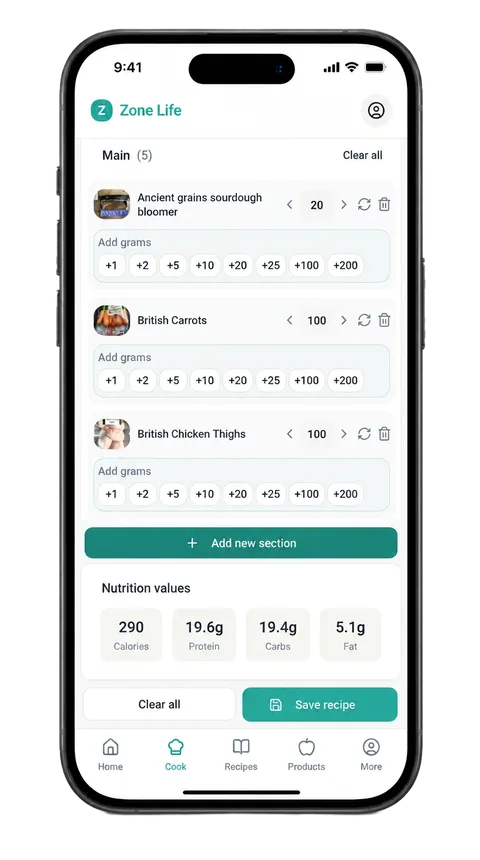
Cook
Add ingredients while you cook and see the nutrition for your portion.
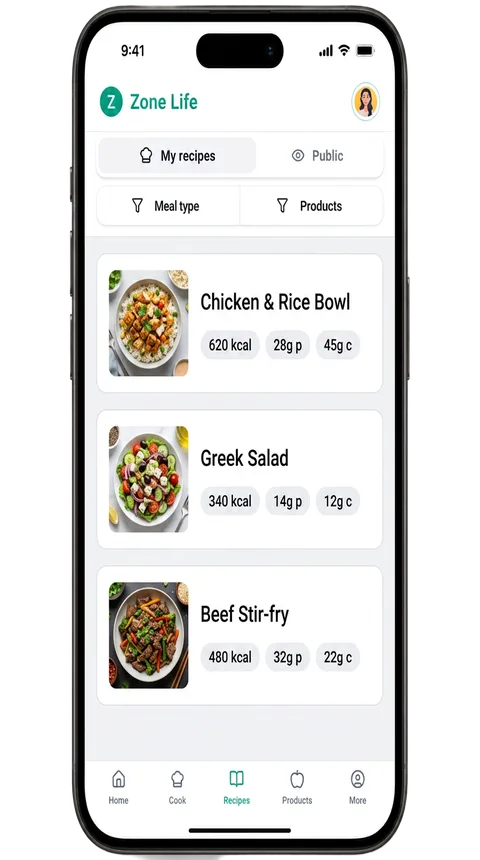
Recipes
Save a dish once, then log it with one tap.
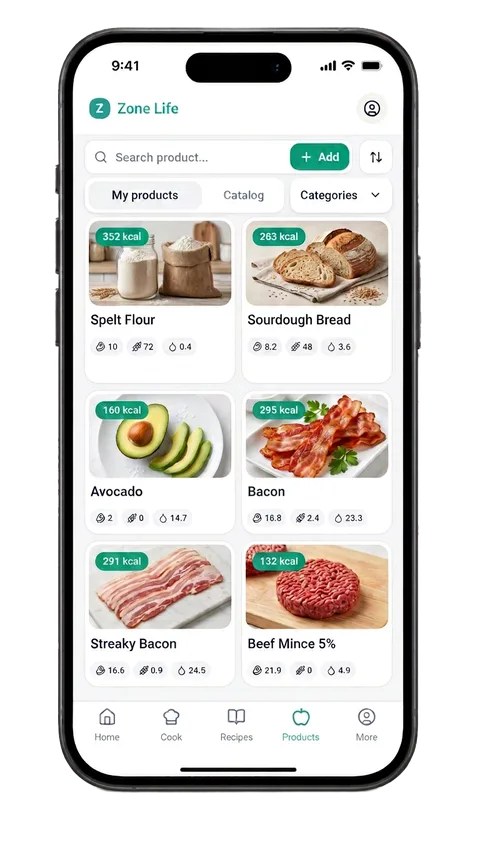
Products
Your own products and a catalogue with calories and macros.
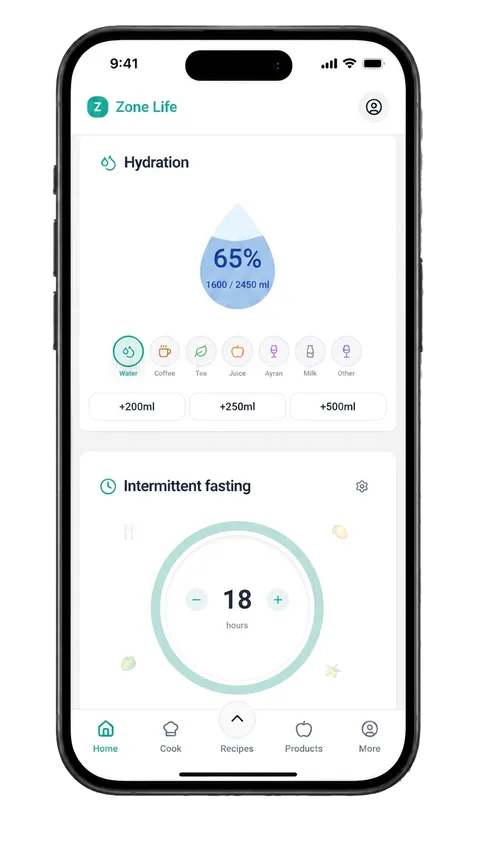
Water and fasting
Hydration and intermittent fasting in one place.
Tracking is easy for a packet. Dinner is the hard part.
Most counters assume the food already has a label. Home cooking has a few extra steps, and each one can throw the number off.
You add ingredients
The onion, the oil, the chicken — each one carries its own calories.
You cook for more than one
The pot is for the table. Your plate is only part of it.
The weight changes
Water leaves the pan, or the rice drinks it in. The raw list is not the cooked dish.
Portions differ
Someone takes a ladle. Someone else takes two.
You still need your number
What mattered was the share you ate, not the recipe card.
Cook once. Save it in the app. Log it again in seconds.
- 01
Add the ingredients
Enter what you used, with the figures from the label or your own food table.
- 02
See the whole pot
Calories, protein, carbohydrate and fat update for the meal you actually made.
- 03
Log your share
A serving, or a weight of the cooked food. The rest of the pot stays in the pot.
- 04
Keep the recipe
In the Zone Life app the meal goes into your library. Next time it is one tap.
The same kitchen log, whatever you are eating this month.
Zone Life does not lock you into one diet. The meals stay. The targets can change.
- 01Calories and macrosFrom the ingredients in the pot to the portion on the plate.
- 02Zone Diet40/30/30 blocks, including a calculator you can use before you sign up.
- 03KetoNet carbs from your recipe, not from a stranger’s curry in a database.
- 04The weekPlace saved meals on the days ahead and build the shopping list.
- 05Fasting and habitsA timer you start and stop, plus water and the routines around the food.
There is also a high protein mode for training days. It uses the same meals and the same targets screen. You switch when you want to. The diary comes with you.
Four calculators, before you make an account.
Protein, a family pot split into two plates, Zone blocks, and a keto day with a fasting window. The arithmetic stays in the browser.
Guides and comparisons
Guides
A family pot, a 7 day Zone plan, 16:8, keto without barcodes, and raw versus cooked weight.
Comparisons
Next to MyFitnessPal, Cronometer, Yazio, Lose It, MacroFactor and ZoneIt.
Calculators
Protein, portions, blocks, and keto with a fasting window.
Dishes
Musaka, mish mash, shakshuka, salmon and more home cooked dishes, with typical ranges.
A library of the meals you actually repeat.
Recipes from your kitchen
Breakfasts, lunches and the Tuesday pot. Once they are saved, you stop starting from zero.
A week that writes the list
Put those recipes on the days. The shopping list adds the onion from Monday to the onion from Friday.
The hours around the plate
Fasting, water and a few daily habits sit next to the food log, not in a second app.
New, on the web and on iPhone.
- English and Bulgarian. Use the language you cook in.
- Also on iPad. The same account works in the browser at the kitchen counter.
- You set the calorie, protein, carbohydrate and fat targets. The app shows what you logged against them.
- Zone Life is a diary. It is not a medical service, and it is not affiliated with Zone Labs or Dr. Barry Sears.
Questions
What is Zone Life?
Zone Life is a calorie and macro diary built for home cooking. You enter ingredients, see the meal, and log the portion you ate. It also keeps recipes, a weekly plan, a shopping list, a fasting timer, water and habits. You can follow calories, the Zone Diet, keto or a high protein target.
Is it free?
You can start on the web at no charge. Zone Life Pro on iPhone — monthly, 6 months or yearly — includes a 7 day free trial. The App Store shows the price before you pay. This page does not print a price, because it can change.
Does it work in Bulgarian?
Yes. The app is in English and Bulgarian, and this site has both. The Zone Diet calculator has its own language switch.
Is this medical advice?
No. Zone Life is a food diary. It does not diagnose, treat or tell you what you should weigh. Talk to a doctor before you change how you eat, especially during pregnancy, under 18, or while you are being treated for a condition.
Where do I start?
Open the web app and add the ingredients of the next meal you cook. If you want the Zone arithmetic first, use the calculator on this site. It does not require an account.
Cook the meal. Log the portion.
The web app is free to start. The iPhone app includes a 7 day free trial of Zone Life Pro.